Showing posts with label IITG. Show all posts

Tuesday, 21 June 2016

Australian NBN. Too little too late (Part 1)

To most, the Australian National Broadband Network (NBN) is an unnecessary burden on the economy dreamt up by self serving politicians trying to win votes. Some of those same people also believe the NBN will only be useful to those who download illegal content or watch porn.


In this two part article, we're going to talk about how the NBN will affect you even if you oppose the project. We'll also discuss the key differences between Fibre To The Premise (FTTP) NBN and Fibre To The Node (FTTN) NBN. Finally,  we'll look at a couple of real world use cases that you probably weren't aware of but will damn sure want to take advantage of. All with the typical IITG spin that will make this article just a little less shit.

The politically bias among us will no doubt cry one way or another but it's important to remember one thing; i hate all political parties equally. Yes, even yours.

What Is The NBN?


In a nutshell it's high (or in some cases highER) speed internet for all. The kind of internet which can be easily upgraded at relatively low cost to the taxpayer and has a longer shelf life than our existing forms of fixed broadband such as copper or cable.

The coalition stated that their NBN will be delivered quicker and cheaper than the now redundant labor NBN. It makes you wonder why we don't build more government projects with that mentality.

  • Roads can be delivered quicker and cheaper if we only use dirt.
  • Trains and buses can be delivered quicker and cheaper without seats.
  • Hospitals beds can be delivered quicker and cheaper if patients sleep on the floor.
  • Exotic dancers can... ummm... well, you get my point.

Connecting To The NBN. Will It Be Easier?


When you move into a new home, its often a mission to not only locate the correct wall socket but also verify whether the router and cable from your old house will work in your new house. When it doesn't, its off to the shops to buy the necessary cable/converter. Given the time wasting nature of the exercise i expect complaints laden with plenty of expletives thrown in for good measure. Unfortunately for some, this process will not change under the existing FTTN rollout.

We've all had to look for at least one of these at least once in our lives

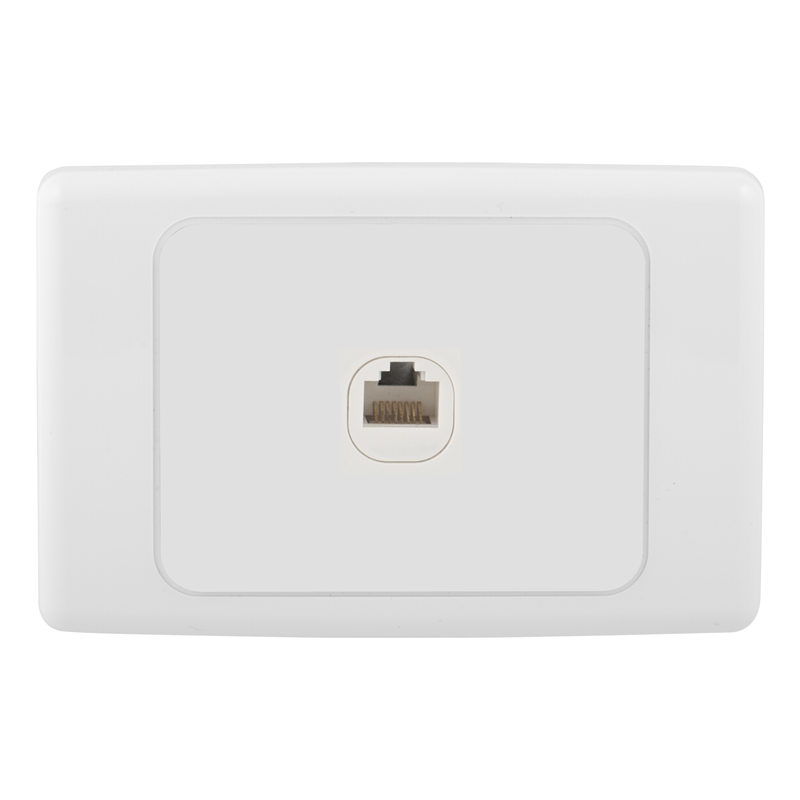
FTTP on the other hand leaves you with a gray box in your home with an RJ45 jack waiting for your router to be plugged into it. Simply plug in an appropriate router and your done.

Find this pair of boxes somewhere in your house or garage and.....

Aim your cable for that port and you can't really go wrong.

Yeah, you heard me! no configuration, no username or passwords and no fancy settings to deal with. We've gone from having to deal with a telephone cable, adapter, inline filters etc to buying one RJ45 cable! ONE CABLE! The next time you move to another FTTP home, you'll know to look for and what to do.

How Much Speed Do I Really Need?


Before we can review how much speed is truly necessary, it's important for us to define how much each technology is capable of delivering.

Both FTTN and FTTP are capable of delivering 100 Mbps of download bandwidth. However, in a University of Melbourne study titled Broadband Facts, Fiction and Urban Myths, Figure 6 shows how quickly FTTN speeds deteriorate based on your cabled distance from the node. This explains why it must have been important for the coalition to reassure the public that they are "absolutely confident that 25 megs is going to be enough". It has to be or else they're going to be in trouble.


At 34:53 Tony Abbott tells YOU how many megabits per second YOU need.

FTTP on the other hand does not have this limitation. 100 Mbps download (and eventually 1000 Mbps) is achievable as long as you have FTTP in the first place. In a recent news.com.au article it has also been the deciding factor for one particular couple who work from home. Should the couple move again they agreed they will favour locations with FTTP.

With the car manufacturing industry faltering in South Australia. The SA state government have decided they will aim to create a 10Gb or 10,000 Mbps city which they hope will attract businesses, residents and knowledge economies. Let's be honest, if you're a Netflix or an Apple Computer Inc, a 10Gb city with a more affordable property market starts to look VERY appealing. Opening an office or datacenter isn't the only reason, it's all those potential customers with super fast internet who you'll want to sign up to your latest streaming service.

Whichever way you slice it, the internet of tomorrow is going to need to be capable of delivering multiple Full HD 1080p streams (5 - 9 Mbps per stream) and the odd 4K video stream (requires >25 Mbps per stream), web browser traffic (2 - 3 Mbps) and downloads (everyone downloads something!) to the majority of households in Australia. Compare this to today's paltry 24 megabit per second maximum theoretical speed of ADSL2+ quoted by EVERY internet service provider in Australia. The speed that's only really possible if your house is the same distance from the exchange as the average length of a pubic hair.

What About Wireless?


With 4G networks becoming faster than some peoples home internet connection and 5G on the way, it's totally understandable to think that wireless is the way of the future and number one contender to replacing fibre. Let's start by breaking down wireless into terms everyone can understand to see whether it really is better than fibre.

There can be multiple highways (3G highway, 4G highway, 5G highway etc) run by your mobile carrier (Vodafone, Optus etc). Your phone will try to connect to the fastest highway it can but your mobile carrier will dictate

  • Where you can enter the highway (mobile towers)
  • The maximum speed limit you can travel at
  • Number of lanes you can use (radio frequency spectrum)


Just like a normal highway, there are many more users during peak hour so you can't always travel at or close to the maximum speed. Also, what happens when others find out your highway performs better? They upgrade their mobile device and/or change carrier and suddenly there's more congestion and traffic begins to move slower and slower. Suddenly your seeing speeds of only a few Mbps! Where did the other 90 something megabit? Never forget that maximum theoretical speeds are pretty useless in the real world. Japan's NTT breaks fibre optic data speed record setting a maximum throughput rate of 1 Pbps or 125,000,000 Mbps.

Finally, the faster the highway, the closer you need to be to its entrance in order to use it. Don't forget that obstructions like walls etc will essentially move you further away from the entrance and force you to use a highway with less lanes and a lower speed limit.

This is what a Wireless NBN would probably look like if some have their way

Figure 12 in Broadband Facts, Fiction and Urban Myths shows fibre capable of speeds 10,000 times greater than the entire radio spectrum. What the graph doesn't tell you is that speed can be allocated to a single user. Imagine having a highway that's completely dedicated to you and only you and now your starting to see the power of fibre.

As we move closer towards an "internet of things" where more things are connected to the internet, it's likely we'll still see congestion and interference. Also, with relatively low bandwidth quotas, and quite expensive rates if you exceed them, I'm not confident it will be the silver bullet for those who champion wireless as the technology of the future.

Stay Tuned For Part 2...

Sunday, 4 October 2015

Rack 2 Rebuild

If you haven't already read it, i suggest reading about the BW Rack 1 Rebuild because all of the nitty gritty is covered in that blog post.

The only difference with this rebuild is the fact that we pre-cabled every single port and put cable labels on both ends of each network cable.

Before The Rack 2 Rebuild


And the moment you've all been waiting for...

After The Rack 2 Rebuild


The middle of the server rack.

The lower half of the server rack.


The top of the server rack before we re-routed the pesky electrical conduit.


And the front of the rack 2 server rack. Doesn't that look nice?


Took two people a day to get that done but i'm sure you can agree it looks great.

IITG 

Rack 1 Rebuild


So how do we do it? and why do we do it?

That's easy. How we do it is listed below. Why we do it, is pretty simple. It makes maintenance easier, troubleshooting easier, and it just looks like it's something that you can really be proud to show off.

Planning

This all starts as most things start, with an Excel spreadsheet. I find that a spreadsheet allows me to visualise exactly which RU the equipment will be loaded into. After all, it's better to shuffle machines around in a spreadsheet than it is once the servers are in place.

When finding a home for a piece of equipment, there's a couple of things i try to keep in mind. I try to load all of the equipment as close to the middle of the rack as i can with the most frequently accessed pieces (such as an LCD KVM) mounted closer to the middle so your not having to bend down or look up to use them. I will leave a space or two here and there for additional pieces of equipment but those with a lot of potential for expansion (such as a SAN) i will load at the edge. This of course means that I'll generally fill a rack with a maximum of two pieces of equipment which have a large potential for expansion. It's at this stage that a capacity plan could really come in handy. Unfortunately, i never seem to have one so i do my best with the information i have at the time and add an extra RU or two where i can.

Rack UPSs

When it comes to a rack UPS, i mount them at the bottom of the rack. Pretty simple really, they're usually quite heavy and by mounting them lower down they're easier to slide in and out. At least, that's what i think. Usually i mount these UPS systems by myself and i find it easy. With two people, it should be no problem.

Patch Panels / KVMs etc

I keep my patch panels, KVMs etc for smack bang right in the middle of the rack. Why? because it allows to me to purchase standard length cables which are readily available. Sometimes you forget to order enough, or new equipment is added after you've finished planning and it's more likely you'll have a few of these shorter cables just lying around.

Once all of the equipment locations are finalised, it's time to move onto the cabling. My spreadsheet tracks the numbers, lengths and colours of each cable that's connected to each piece of equipment. Once i'm done, i can tally up the totals ready for the purchasing. Don't think the spreadsheet just tracks network cables either. I also keep track of the quantity, length and colour of each power cable as well.

Purchasing

Server Rack

We replaced the existing server rack which was an old Dell PowerEdge rack with an APC AR3100 42U server rack. This also allows us to pre-cable and pre-load as much equipment as possible into the new server rack and simply unload the old rack, remove it from the area, 

The other benefit was the fact that the APC had Zero U mounting points allowing us to mount PDUs on one side and cable management on the other.

Cable Management

We use APC Vertical Cable Organizers for vertical cable management. There's not much to be said but i highly recommend them.

At the top of the rack, we have a 600mm APC Cable Trough. The electricians use the cable trough mainly. Also, the the outlet boxes are mounted to the cable trough.


APC cable troughs, when connected together allow the server rack to be removed independently of the electrical. When the server rack was replaced, we needed electricians onsite to disconnect and relocate the outlets. With the outlets mounted on the cable trough, the electricians are no longer required when replacing the server rack. Below is what the top of the server rack used to look like and as you can see, there's no way around getting the electricians onsite without that cable trough.


We used a ton of velcro cable wraps for data cables and cable ties for power cables, SAS cables etc. Buy this stuff in bulk because you'll rip through the stuff quite quickly if you want your installation to look neat.

Also, replacing cable ties is annoying. Use them only where necessary.

PDUs

We used a pair of APC AP8959 Switched IP PDUs. In a 240v single phase environment with 20amp circuits these are probably the best for the job. In this environment, they'll handle up to 16 amps each which is enough to meet the CTO's needs.

One of the PDUs (the inner most one) is connected to a UPS while the other is simply connected directly to mains power.

KVM

We purchased a 16 port Dell 2162DS IP KVM. It's cheap and nasty but does the job. I have to say, it was my first time dealing with it and i probably don't want to re-use them ever again. Check out the marketing video. It played no part in selecting the KVM but here you go:


You might be wondering, what happens when you have more than 16 servers in a rack? Well, either you upgrade the KVM or you designate one SIP to be a 'floating' SIP to quickly connect to the new servers.

Before you ask why not just buy a bigger KVM? It wasn't an option and the CTO is quite happy to upgrade when necessary.

Rack UPS

Again we turn to Dell for a UPS. From memory it was a 1920w line interactive UPS. We also added an Extended battery module (EBM) and an network management card so it could be remotely managed and monitored. We also purchased a Dell temperature probe to keep track of the temperature within the rack.

While you might seem to think that this would be quite small, you need to remember that this UPS is connected to just one PDU and therefore only needs to power HALF the total power demand of the rack.

During post installation testing, we were at 1 hour of battery backup time for the entire server rack. This far exceeded the 20 minute requirement set by the CTO. Without the EBM though, we were at 15 minutes of battery backup time. The system can't be expanded beyond this capacity. You get what you pay for, nuff said.

Pictures Before The Rebuild


After The Rebuild


Although the picture doesn't show it, we wrapped the IEC leads connected to the outlets in the same colour as their feed cable (Red or Blue). This ensures you always know your dealing with the right power outlet.

You can also clearly see the status of those two outlets without opening the doors. This was something that wasn't possible with the old setup.


And this is the front of the server rack. In the end, we ditched the Dell covers on the front of the servers. I'm sure there's plenty of good reasons to do it such as airflow, better visibility of status lights etc. The real reason though was that they look ugly.


And then before and after. You'll also notice we scrapped the Dell cable management arms. I'm sure there's plenty of good reasons to do it such as airflow, better visibility of status lights etc. The real reason though, well, you know why.


And that's how you rebuild a server rack, costs a little bit but so much easier to work on than what was there before.

IITG

Saturday, 26 September 2015

Who Is The Ignorant IT Guy

An IT guy who's been in the industry for over 10 years. I left school after year 10 and started working packing computers into boxes for Acer before being moved to the production line building and imaging the computers. Earning a little over $200 AUD and being 17 years old at the time, obviously i felt like a millionaire being able to purchase random crap for myself, my girlfriend and my friends.

As my contract with Acer finished, i found work at a local sports centre. I was able to use the facilities for free, and learn about linux by implementing an LDAP domain, internal DNS/DHCP, VPN and a generic fileserver.

I managed to someone secure an interview with a medical company and began work as a helpdesk engineer. In under two years, i had received four promotions making it to a linux systems administrator by hard work and hands on self education.

I've had no formal training prior to entering the industry and still continue in this fashion. I've pretty much learnt everything i know from just getting stuck in and finding out what works and what doesn't.

Generally when something doesn't work, i need to get it fixed as fast as possible. Preferably before anyone notices.

That's who i am. That's why i do what i do. I don't claim to be an expert on anything so don't assume i am. I don't claim to be anything really.

I set this blog up to share my experiences and hopefully expand my knowledge by sharing my thoughts with you and hopefully being corrected at the same time.

IITG